Moving Thymio on a grid
I explore here a way of moving Thymio on a grid composed of square tiles (25cm x 25cm). From the user point of vue, moving Thymio on this kind of grid, leads to instruct Thymio the following orders (assuming for example Thymio is on the center of a tile):
- Move forward one tile
- Move to the next tile on your right
- Move to the next tile on your left
- Go backward one tile
One way to implement this would be to translate the previous specification :
| Movement | Order | |
|---|---|---|
| Move forward one tile | —– | Move 25 cm forward |
| Move to the next tile on your right | —– | Turn 90° right and move 25cm forward |
| Move to the next tile on your left | —– | Turn 90° left and move 25cm forward |
| Go backward one tile | -—- | Turn 180° and move 25cm forward |
But Thymio doesn’t support the instruction move exactly 25cm forward (and stop) nor turn exactly 90° left (or right). Having this kind of instruction would be great but would be very hard for the robot to handle (think of the motor calibration or the friction on the ground) and at the end would probably skew Thymio on the grid.
Since Thymio excels at following lines, maybe we just help Thymio a little bit by provoding guides on the floor. I chose the following pattern :
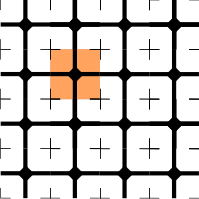

Assuming that Thymio is on the center of the tile (the black losange), we can translate the different movements :
| Movement | Order | |
|---|---|---|
| Move forward one tile | –— | Search for the line in front of you and follow it until the next center |
| Move to the next tile on your right | –— | Search for a line on your right and follow it until the next tile |
| Move to the next tile on your left | —– | Search for a line on your left and follow it until the next tile |
| Go backward one tile | –— | Make a U-turn, search for a line and follow it until the next tile |
We can thus extract two main behaviours that Thymio has to learn :
- Follow a black line and stop on a center of a tile
- Search for a line (on left / right / bottom) from the center of a tile.
Follow the black line and stop on a center of a tile
Note : The black lines are drawn so that it can fit between the two sensors below the robot.

- Thymio’s right sensor is on the line, it needs to move right a little bit. The idea is keep the angle between Thymio and Thymio small
- Thymio’s left sensor is on the line, it needs to move left a little bit
- Both sensors are above a black region, we stop assuming that it can be only the center of the tile. We change the internal state to reflect that Thymio is waitinga for a user interaction.
Search for on the right from the center of a tile
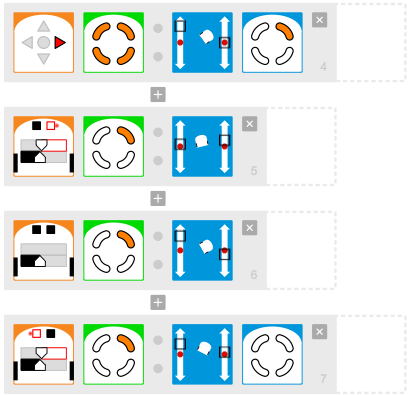
- When the right arrow is pressed we start the procedure that search the line on the right. Thymio is instructed to turn right (rapidly). The first sensor to capture a change is the right sensor which will detect a white region.
- & 3. allow the right sensor to keep track of the border of the black region
- Detects the first time the left sensor is above the white region, meaning that the losange part is behind the robot and more importantly that Thymio just found the line.